Introduction to CSS Box Model | Part 2
Introduction to CSS Box Model | Part 2 | Cheat Sheet
CSS Box Properties
1. Border Width
The CSS border-width property specifies the width of the border for all four sides of an HTML element.
eg:
.button {
border-width: 2px;
}
The CSS Property and value pair border-width: 0px; removes the border of an HTML element.
WARNING:
Specifying the CSS border-style property for an HTML element is mandatory. Otherwise, the CSS properties like border-color, border-width will not appear in the browser. The HTML button element is an exception as it appears with a border in the browser by default.
2. Border Radius
The CSS border-radius property specifies the roundness of the corners of an HTML element.
eg:
.button { border-radius: 20px; }
You can use the below CSS properties to round a specific corner of an HTML element.3. Border Color
The CSS border-color property specifies the color of the border for all four sides of an HTML element.
eg:
.button {
border-color: orange;
}
WARNING: Specifying the CSS border-style property for an HTML element is mandatory.
Otherwise, the CSS properties like border-color, border-widthwill not appear in the browser. The HTML buttonelement is an exception as it appears with a border in the browser by default.
4. Border Style
The CSS border-style property specifies the style of the border for all four sides of an HTML element.
eg:
.border {
border-style: dashed;
}
You can use one of the below values of the CSS border-style property.
border-style values: dotted, dashed, solid, none.
5. Padding
The CSS padding property specifies the space around the content of an HTML element.
eg:
.padding {
padding: 10px;
}
CSS Colors
1. Hex Code
CSS Colors can be represented in multiple ways:
- Color names
- Hex Code
- HSL
- RGB and many more...
Since few colors have the Color names, Hex Codes make a good alternative to pick a wide variety of colors.
Some of the Color names and their Hex Codes are:
color name - Hex code
orange - #ffa500
red - #ff0000
and so on.......
eg:
.background {
background-color: #25b1cc;
}
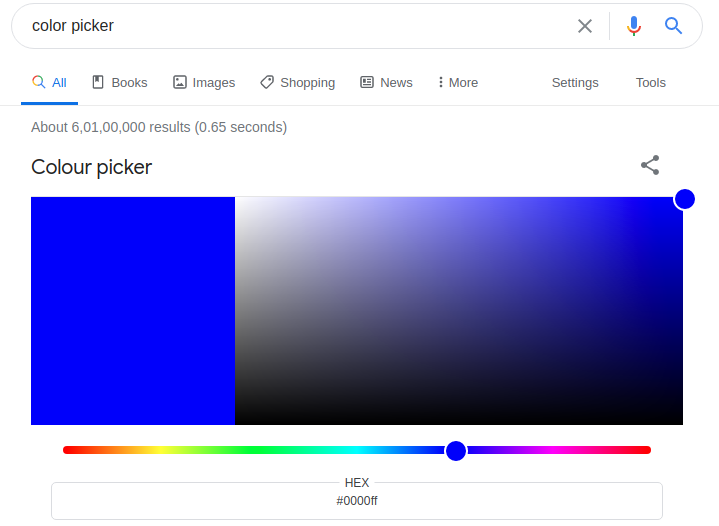
How to pick a color using Hex Code
The color picker lets you pick a color among the approximately 16,777,216 colors available.
One of the simplest ways to access a color picker is:
Type color picker in the Google Search bar and search it.
HTML:
<!DOCTYPE html> <html> <head></head> <body> <div class="card"> <h1>Tourism</h1> <p>Plan your trip wherever you want to go</p> <button class="button">Get Started</button> </div> </body> </html>
CSS:
.button {
border-width: 2px;
border-color: orange;
border-style: dashed;
border-radius: 10px;
background-color: #25b1cc;
}
.card {
padding: 10px;
}
output:
Tourism
Plan your trip wherever you want to go
NOTE:
In the preview of the above code playground, you can't see the blue border around the
HTML button element when you click inspect because the HTML buttonelement already
has borders.


Comments
Post a Comment