Introduction to CSS Part 3
Introduction to CSS | Part 3 | Cheat Sheet
1. Font Family
The CSS
font-family property specifies the font for an element.
.main-heading {
font-family: "Arial";
}
.paragraph {
font-family: "Times New Roman";
}
go online for more font-family values.
2. Font Size
The CSS
font-size property specifies the size of the font.
.main-heading {
font-size: 36px;
}
.paragraph {
font-size: 28px;
}
Note
- You must add px after the number in the value of the font-size property.
- There shouldn't be any space between the number and px.
- There shouldn't be any quotations around the value of the font-size property.
3. Font Style
The CSS
font-style property specifies the font style for a text. You can use one of the below values of the font-style Values are normal, italic, oblique.
.main-heading {
font-style: italic;
}
.paragraph {
font-style: normal;
}
Note:
- There shouldn't be any spelling mistakes in the values of the font-style property.
- There shouldn't be any quotations around the value of the font-style property.
4. Font Weight
The CSS
font-weight property specifies how thick or thin characters in text should be displayed.
.main-heading {
font-weight: bold;
}
.paragraph {
font-weight: 200;
}
Note:
- font-weight property,Values are normal, bold, bolder, lighter, 100, 200, 300, 400, 500, 600, 700, 800, 900.
- There shouldn't be any spelling mistakes in the values of the font-weight property.
- There shouldn't be any quotations around the value of the font-weight property.
- The numerical values given to the font-weight property must be in the range from 100 to 900 and should be the multiples of 100.
5. Text Decoration
The CSS
text-decoration property specifies the decoration added to the text.
.main-heading {
text-decoration: underline;
}
.paragraph {
text-decoration: overline;
}
You can use one of the below values of the
text-decoration Values are underline, line-through, overline
Note
- There shouldn't be any spelling mistakes in the values of the text-decoration property.
- There shouldn't be any quotations around the value of the text-decoration property.
- Ensure that text-decoration and line-through are hyphenated.
HTML:
<!DOCTYPE html>
<html>
<head></head>
<body>
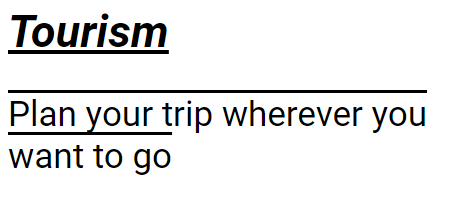
<h1 class="main-heading">Tourism</h1>
<p class="paragraph">Plan your trip wherever you want to go</p>
</body>
</html>
CSS:
.main-heading {
font-family: "Times New Roman";
font-size: 36px;
font-style: italic;
font-weight: bold;
text-decoration: underline;
}
.paragraph {
font-family: "Arial";
font-size: 28px;
font-style: normal;
font-weight: 200;
text-decoration: overline;
}
OUTPUT:


Comments
Post a Comment